Workday Pro Integrations Certification Exam
Last Update Oct 23, 2026
Total Questions : 109
We are offering FREE Workday-Pro-Integrations Workday exam questions. All you do is to just go and sign up. Give your details, prepare Workday-Pro-Integrations free exam questions and then go for complete pool of Workday Pro Integrations Certification Exam test questions that will help you more.



What XSL component is required to execute valid transformation instructions in the XSLT code?
Refer to the following XML to answer the question below.
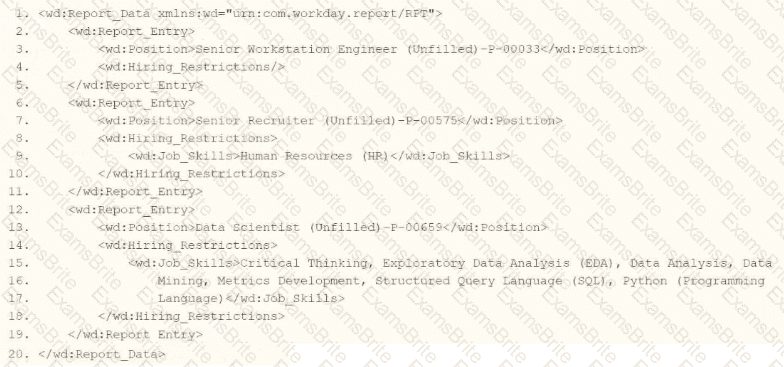
You are an integration developer and need to write X8LT to transform the output of an ElB which is using a web service enabled report to output position data along with hiring restrictions around skills. You currently have a template which matches on wd:Report Data/wd: Report .Entry for creating a record from each report entry.
Within the template which matches on wd:Report_Entry you would like to conditionally process the wd:Job_Skills element by using a series of < xsl:if > elements so as to categorize the job skills data.
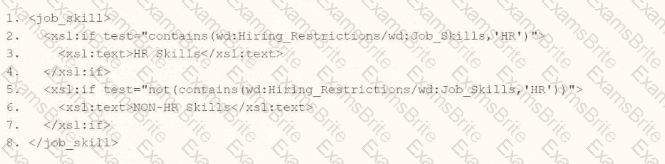
Assuming all jobs will have the wd:Job_Skills element, what XSLT syntax would be used to output the text HR Skills if the value of wd:Job_Skills contains the text HR and output NON-HR Skills if the value of wd:Job_Skills does not contain the text HR?
A.
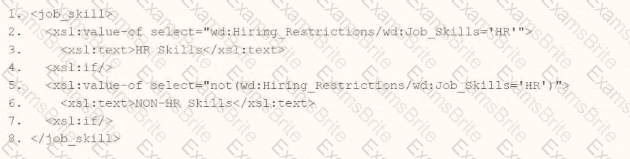
B.
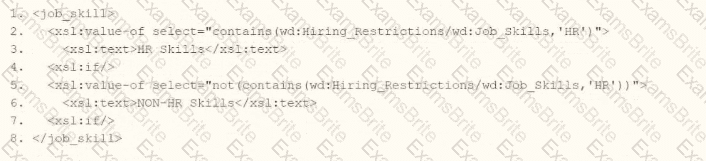
C.

D.
Refer to the following scenario to answer the question below.
You have configured a Core Connector: Worker integration, which utilizes the following basic configuration:
• Integration field attributes are configured to output the Position Title and Business Title fields from the Position Data section.
• Integration Population Eligibility uses the field Is Manager which returns true if the worker holds a manager role.
• Transaction Log service has been configured to Subscribe to specific Transaction Types: Position Edit Event.
You launch your integration with the following date launch parameters (Date format of MM/DD/YYYY):
• As of Entry Moment: 05/25/2024 12:00:00 AM • Effective Date: 05/25/2024
• Last Successful As of Entry Moment: 05/23/2024 12:00:00 AM
• Last Successful Effective Date: 05/23/2024
To test your integration, you made a change to a worker named Jared Ellis who is assigned to the manager role for the IT Help Desk department. You use the Change Business Title related action on Jared and update the Business Title of the position to a new value. Jared Ellis ' worker history shows the Title Change Event as being successfully completed with an effective date of 05/24/2024 and an Entry Moment of 05/24/2024 07:58:53 AM however Jared Ellis does not show up in your output. What configuration element would have to be modified for the integration to include Jared Ellis in the output?
You are creating an outbound connector using the Core Connector: Job Postings template. The vendor has provided the following specification for worker subtype values:
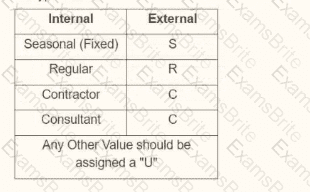
The vendor has also requested that any output file have the following format " CC_Job_Postings_dd-mm-yy_#.xml " . Where the dd is the current day at runtime, mm is the current month at runtime, yy is the last two digits of the current year at runtime, and # is the current value of the sequencer at runtime. What configuration step(s) must you complete to meet the vender requirements?
Refer to the following XML to answer the question below.
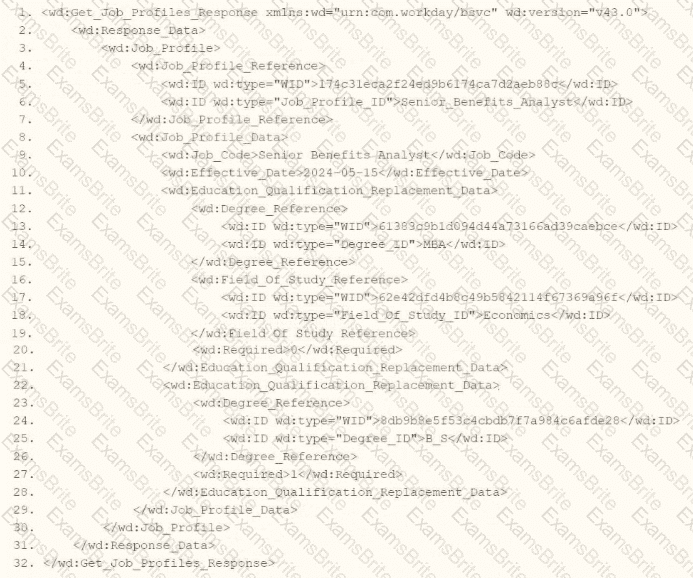
You are an integration developer and need to write XSLT to transform the output of an EIB which is making a request to the Get Job Profiles web service operation. The root template of your XSLT matches on the < wd:Get_Job_Profiles_Response > element. This root template then applies templates against < wd:Job_Profile > . What XPath syntax would be used to select the value of the ID element which has a wd:type attribute named Job_Profile_ID when the < xsl:value-of > element is placed within the template which matches on < wd:Job_Profile > ?
You are configuring the Core Connector: Location to send location data to a new global facilities management system. You must meet three specific requirements:
Task A: The facilities system requires that in addition to the default public address, the private address should also be included.
Task B: The facilities system uses the status codes “A” for Active and “I” for Inactive. You need to translate Workday’s “Active” and “Inactive” values from the Location Status field.
Task C: The facilities system requires a “Building Manager” value. You have already built a Calculated Field that retrieves the Facilities Manager role for each location, and you need to send this data in the integration.
How do you configure these tasks in the integration system?
After configuring domain security policies, what task must you run to ensure the most recent changes go into effect?
What XSL component is required to execute valid transformation instructions in the XLST code?
You are creating a connector based integration where all fields are provided by the template. However, the vendor would also like the following configurations as well:
• A file name output to have the current date and integration run number
• Have internal values for a particular field transferred to their external values
What workflow would you follow to create this integration?
Refer to the following XML to answer the question below.
You are an integration developer and need to write XSLT to transform the output of an EIB which is using a web service enabled report to output worker data along with their dependents. You currently have a template which matches on wd:Report_Data/wd:Report_Entry for creating a record from each report entry.
Within the template which matches on wd:Report_Entry you would like to conditionally process the wd:Dependents_Group elements by using an < xsl:apply-templates > element.
What XPath syntax would be used as the select for the apply templates so as to iterate over only the wd:Dependents_Group elements where the dependent relationship is Child?
Which components make up the three primary parts of an outbound Enterprise Interface Builder (EIB)?
Refer to the following scenario to answer the question below.
An external system needs a file containing data for recent worker job changes. They would like to receive a file routinely at 5 PM eastern standard time, every 48 hours. The file should show job changes since the last integration run.
What is the run frequency of the integration schedule?
Refer to the following scenario to answer the question below.
You are configuring a Core Connector: Worker integration with the Data Initialization Service (DIS) enabled. The integration must extract worker contact details and job information, including a calculated field override that determines phone allowance eligibility.
You need to review and correct the security configuration so that all overrides are secured appropriately and data is successfully extracted, resolving any security issues that arise when testing runs of the integration.
While troubleshooting issues with the connector, you are looking for a report which allows you to see how a given item is secured.
What report or task would assist you in this?
How do you initially upload the XSLT file to a Document Transformation integration system?
You need to filter a custom report to only show workers that have been terminated after a user-prompted date.
How do you combine conditions in the filter to meet this requirement?
What is the workflow to chain a Document Transformation system to a Connector integration for the purpose of transforming the output?
Refer to the following XML and example transformed output to answer the question below.
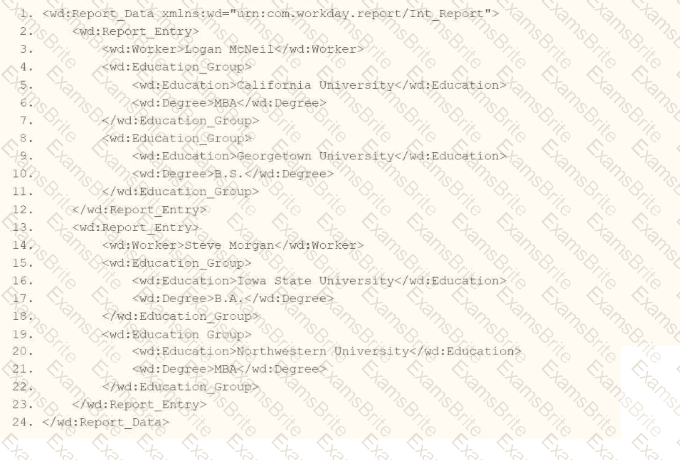
Example transformed wd:Report_Entry output;
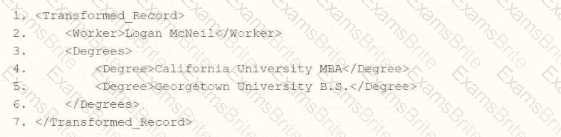
What is the XSLT syntax tor a template that matches on wd: Educationj3roup to produce the degree data in the above Transformed_Record example?
A.

B.
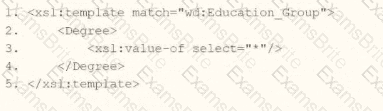
C.

D.
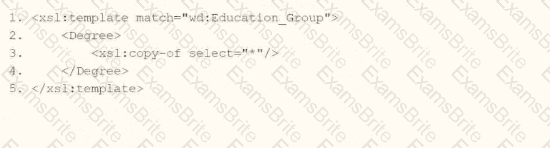
Refer to the scenario. You are implementing a Core Connector: Worker integration to send employee data to a third-party active employee directory. The external vendor requires the following:
The Employee ' s Active Directory User Principal Name.
A mapping from Worker Type values to external worker type codes.
A specific filename format that includes a timestamp and sequence number.
You also need to ensure the document transformation occurs before the file is delivered to the endpoint. You must include an Employee’s Active Directory User Principal Name (generated by a Calculated Field).
How do you ensure this field is pulled into the output?
Refer to the scenario. You are configuring a Core Connector: Worker integration with the Data Initialization Service (DIS) enabled to extract worker demographic and contact information. The integration must include worker fields such as name, address, and a calculated field identifying workers eligible for a phone allowance.
The Phone Allowance Type calculated field exists and is functional in the tenant, but it is not displaying in the output.
What configuration step should you complete to include this field in the output?
You are creating an outbound connector using the Core Connector: Organization Outbound template. The vendor has provided the following requirements for how the data should appear in the output file.
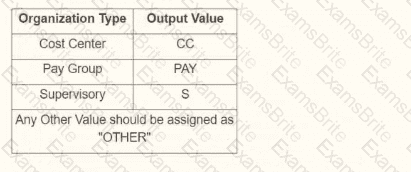
The vendor would also like to change the default document retention policy of 30 days to 7 days. What tasks do you need to use to configure this in your connector?
The following XML code was generated through a RaaS that will be used in an EIB.
What XSLT code snippet will output the number of dependents for each employee if a wd:Dependents_Group exists and output “This employee has 0 Dependents” if the wd:Dependents_Group does not exist?
You are configuring an EIB that uses a custom report as its data source. When attempting to transfer ownership of the report to the Integration System User (ISU), the ISU does not appear as an option for new report owners. You confirm that the ISU already has the necessary access to the report data source and related fields.
Within the Custom Report Creation domain, which security configuration should you update to allow the ISU to appear as a valid report owner?
An external system needs a file containing data for total hours of overtime worked for each worker. They would like to receive a file at the end of each month. The file should show compensation changes since the last integration run.
What is the recurrence type of the integration schedule?
The following XML code was generated using Core Connector: Location.
You need to validate that both the locc:Location_Name and locc:Municipality elements are not empty, and provide custom error messages with a severity level for each.
Which XSLT attributes and values should you use when producing a pipe-delimited file?
A benefits provider requests a file containing updated compensation data from your Workday tenant. They want to receive this file at exactly 5:00 PM Eastern Time every weekday, but not on weekends. The file should include only compensation changes that occurred since the last integration run.
How should you configure the run frequency of the integration schedule to meet these requirements?
A calculated field used as a field override in a Connector is not appearing in the output. Assuming the field has a value, what could cause this to occur?
What is the task used to upload a new XSLT file for a pre-existing document transformation integration system?
You have an existing Core Connector: Organization (non-IS) integration that sends organization data to an external vendor. The vendor now requires a specific Legacy ID for each organization to be added to the output. A calculated field that generates this Legacy ID already exists in the tenant.
What is the high-level workflow order you would follow to add this calculated field to the output of the integration?
You have been asked to create a report that will be used by the EIB to output only workers with Child Dependents.
How do you configure the custom report to meet these requirements?
What is the purpose of granting an ISU modify access to the Integration Event domain via an ISSG?

TESTED 23 Oct 2026