BIG-IP Administration Support and Troubleshooting (F5CAB5) exam
Last Update Sep 21, 2026
Total Questions : 65
We are offering FREE F5CAB5 F5 exam questions. All you do is to just go and sign up. Give your details, prepare F5CAB5 free exam questions and then go for complete pool of BIG-IP Administration Support and Troubleshooting (F5CAB5) exam test questions that will help you more.



Users are unable to reach an application. The BIG-IP Administrator checks the Configuration Utility and observes that the Virtual Server has a red diamond in front of the status. What is causing this issue?
Exhibit:
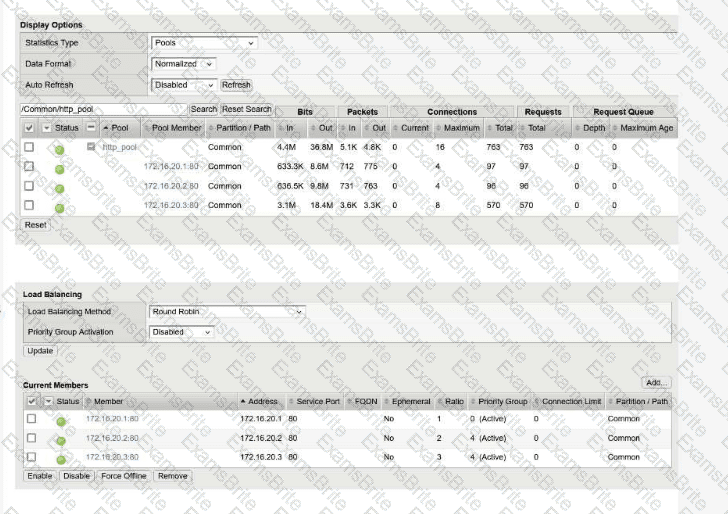
A BIG-IP Administrator configured a virtual server with a pool of 3 members and selected the Round Robin load balancing method to evenly distribute traffic across the pool members. During initial testing, traffic was not evenly distributed and the pool member 172.16.20.3 received more traffic than the other pool members.
Refer to the exhibit and the virtual server configuration provided below:
Plaintext
ltm virtual http.vs {
destination 10.10.1.100:http
ip-protocol tcp
mask 255.255.255.255
persist {
source_addr { default yes }
}
pool http.pool
profiles {
tcp{}
}
serverssl-use-sni disabled
source 0.0.0.0/0
source-address-translation {
type automap
}
translate-address enabled
}
What is the most likely cause of this behavior?
A Virtual Server uses an iRule to send traffic to pool members depending on the URI. The BIG-IP Administrator needs to modify the pool member in the iRule. Which event declaration does the BIG-IP Administrator need to change to accomplish this?
Which file should the BIG-IP Administrator check to determine when a Virtual Server changed its status from RED to GREEN?
A BIG-IP Administrator needs to view the CPU utilization of a particular Virtual Server. Which section of the Configuration Utility should the administrator use for this purpose?
A BIG-IP Administrator configured the following virtual server to pass traffic on all addresses and ports. After configuration is completed, the BIG-IP Administrator notices that the virtual server is unable to pass traffic.
Plaintext
ltm virtual forwarding_any_vs {
destination 0.0.0.0:any
ip-forward
mask 255.255.255.255
profiles {
fastL4 {}
}
serverssl-use-sni disabled
source 0.0.0.0/0
translate-address disabled
translate-port disabled
}
Which part of the configuration is the cause of the issue?
A BIG-IP Administrator receives reports from users that SSL connections to the BIG-IP device are failing. Upon checking the log files, the administrator notices: SSL transaction (TPS) rate limit reached. stats show a maximum of 1200 client-side SSL TPS and 800 server-side SSL TPS. What is the minimum SSL license limit required to handle this peak?
A BIG-IP Administrator is receiving intermittent reports from users that SSL connections to the BIG-IP device are failing. Upon checking the log files, the administrator notices: SSL transaction (TPS) rate limit reached. Reviewing stats shows a max of 1200 client-side SSL TPS and 800 server-side SSL TPS. What is the minimum SSL license limit capacity required to handle this peak?
Clients report that they cannot reach the virtual server vs-production on port 80, but are able to ping the virtual server address. The configuration is shown below:
Plaintext
ltm virtual vs-production {
destination 10.99.20.50:http
ip-protocol tcp
mask 255.255.255.255
profiles {
http {}
tcp {}
}
source 192.168.0.0/16
translate-address enabled
translate-port enabled
vlans {
external
}
vlans-enabled
}
What is the cause?
Refer to the exhibit. A BIG-IP Administrator creates a new Virtual Server to load balance SSH traffic. Users are unable to log on to the servers. What should the BIG-IP Administrator do to resolve the issue? (Exhibit shows a Standard Virtual Server with an HTTP profile applied).
A BIG-IP Administrator configured a virtual server with a pool of 3 members and selected the Round Robin load balancing method to evenly distribute traffic across the pool members. During initial testing, the virtual server failed to respond to http requests.
Plaintext
ltm virtual http.vs {
destination 10.10.1.100:http
ip-protocol tcp
mask 255.255.255.255
pool http.pool
profiles {
tcp{}
}
serverssl-use-sni disabled
source 0.0.0.0/0
translate-address enabled
translate-port enabled
}
ltm pool http_pool {
members {
10.10.1.101:http {
address 10.10.1.101
session monitor-enabled
state checking
}
10.10.1.102:http {
address 10.10.1.102
session monitor-enabled
state checking
}
}
monitor tcp
}
What configuration change on the BIG-IP will resolve this issue?
A BIG-IP Administrator needs to collect HTTP status code and HTTP method for traffic flowing through a virtual server.
Which default profile provides this information? (Choose one answer)
A Standard Virtual Server for a web application is configured with Automap for the Source Address Translation option. The original source address of the client must be known by the backend servers. What should the BIG-IP Administrator configure to meet this requirement?
A set of servers is used for an FTP application as well as an HTTP website via separate BIG-IP Pools. The server support team reports that some servers are receiving a lot more traffic than others. Which Load Balancing Method should the BIG-IP Administrator apply to even out the connection count?
The BIG-IP Administrator is investigating disk utilization on the BIG-IP device. (Exhibit shows /dev/md4 mounted on / at 100% utilization). What should the BIG-IP Administrator check next?
Refer to the exhibit.
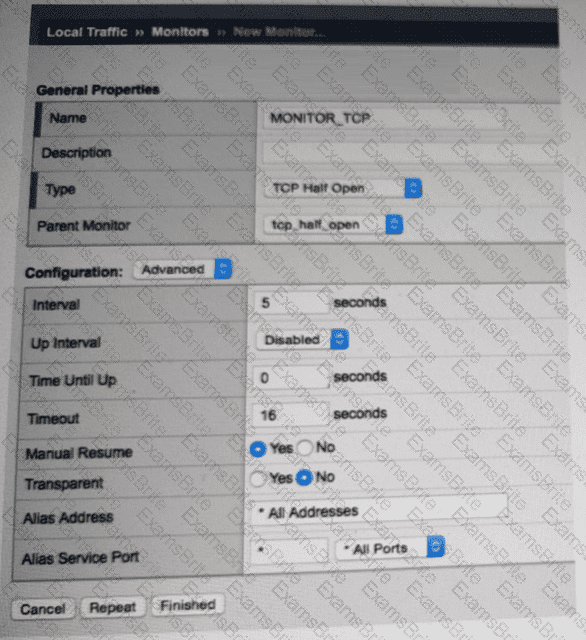
A pool member fails the monitor checks for about 30 minutes and then starts passing the monitor checks. New traffic is NOT being sent to the pool member. What is the likely reason for this problem? (Choose one answer)
Refer to Exhibit:
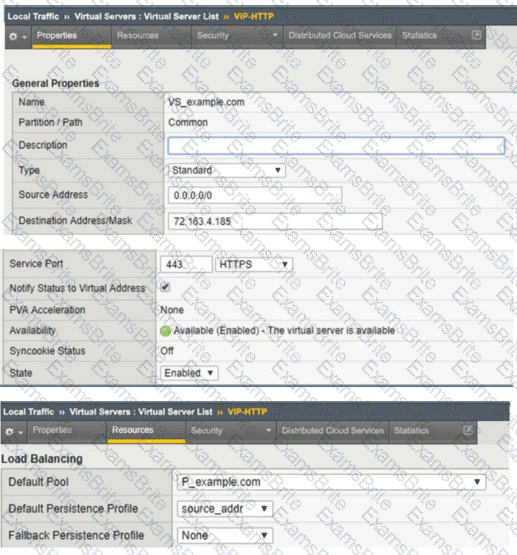
An organization is reporting slow performance accessing their Intranet website, hosted in a public cloud. All employees use a single Proxy Server with the public IP of 104.219.110.168 to connect to the Internet. What should the BIG-IP Administrator of the Intranet website do to fix this issue?
A BIG-IP Administrator observes the following pool member status message:
Pool /Common/testpool member /Common/10.120.0.5:8090 monitor status down
[/Common/http: up, /Common/http2: down; last error:]
Why is this pool member being marked down? (Choose one answer)
Refer to the exhibit.
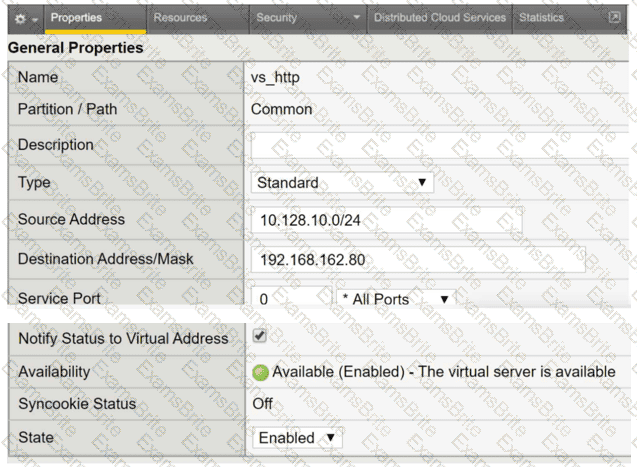
A user with IP address 192.168.162.70 is unable to connect to an HTTP application. What is a possible cause within the Virtual Server configuration?

TESTED 21 Sep 2026