BIG-IP Administration Install, Initial Configuration, and Upgrade
Last Update Sep 21, 2026
Total Questions : 49
We are offering FREE F5CAB1 F5 exam questions. All you do is to just go and sign up. Give your details, prepare F5CAB1 free exam questions and then go for complete pool of BIG-IP Administration Install, Initial Configuration, and Upgrade test questions that will help you more.



For security reasons, a BIG-IP Administrator needs to specify allowable IP ranges for access to the Configuration Utility (WebUI).
The exhibit shows the User Administration section of the Configuration Utility.
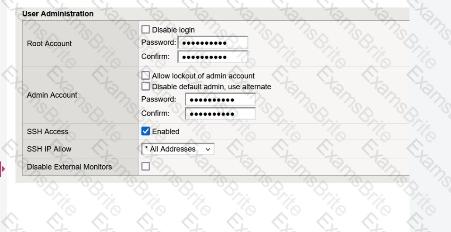
The administrator could not find any setting that explicitly restricts access to the Configuration Utility.
Which one of the following is a reason for that?
How should a BIG-IP Administrator check the provisioned CPU percent for a module?
(Choose two.)
The BIG-IP Administrator received a ticket that an authorized user is attempting to connect to the Configuration Utility from a jump host and is being denied.
The HTTPD allow list is configured as:
sys httpd {
allow { 172.28.31.0/255.255.255.0 172.28.65.0/255.255.255.0 }
}
The jump host IP is 172.28.32.22 .
What command should the BIG-IP Administrator use to allow HTTPD access for this jump host?
Given that BIGIP- < version > .iso and Hotfix-BIGIP- < version > -ENG.iso have been uploaded to /shared/images on an F5 device, what is the appropriate tmsh command to prepare and update the BIG-IP device with the hotfix of a software version on a new volume HD1.2 ?
(Choose one.)
An F5 BIG-IP Administrator is asked to report which modules are provisioned on the BIG-IP.
In which two ways can this be done?
(Choose two.)
A new logging solution is being implemented on the network. Policy requires keeping management traffic sent from the BIG-IP out of the management interface . After configuring the BIG-IP to forward messages to the new Syslog server, the BIG-IP Administrator notices that packets are being sent from a numbered data-plane Self IP .
What should the BIG-IP Administrator change to send the traffic out of the correct interface ?
A BIG-IP Administrator needs to install a HotFix on a standalone BIG-IP device.
The device currently has HD1.1 as the Active Boot Location.
The administrator has already reactivated the license and created a UCS archive.
In which sequence should the administrator perform the remaining steps ?
A secondary administrator has been granted access to a BIG-IP device through its Management Interface , but is unable to access the Configuration Utility (WebUI) .
What command can be run from the CLI to capture the network traffic on the management interface and troubleshoot the issue?
(Choose two.)
What are the two options for securing a BIG-IP’s management interface?
(Choose two.)
The Configuration Utility of a BIG-IP device is currently accessible via its management IP 10.53.1.245 from all VLANs.
The BIG-IP Administrator needs to restrict access so only hosts from the 10.0.0.0/24 subnet can access the Configuration Utility.
Which TMSH command accomplishes this?
A BIG-IP Administrator needs to purchase new licenses for a BIG-IP appliance.
The administrator needs to know:
Whether a module is licensed
The memory requirement for that module
Where should the administrator view this information in the System menu ?
The BIG-IP Administrator needs to update access to the Configuration Utility to include the 172.28.31.0/24 and 172.28.65.0/24 networks.
From the TMOS Shell (tmsh), which command should the BIG-IP Administrator use to complete this task?
An administrator is in the process of reactivating the license using the interface displayed in the exhibit.
What is the address of the license server to which the BIG-IP device must be able to establish an outbound connection in order to use the Automatic Activation Method ?

TESTED 21 Sep 2026